Windows · macOS · Linux · Android

The Pomodoro app with self-reflection and break you can't skip.


Every 25 minutes it takes over your screen for 5 minutes and asks : what did you actually just do?

Free & open source · Source on GitHub · Installation notes

Installation notes & permissions

Windows

SmartScreen may show an “unknown publisher” warning on first run — choose More info → Run anyway.

macOS

The app isn't notarized yet, so Gatekeeper will block it the first time —
1. right-click the app and choose Open (Drag to Applications directory)
2. Run xattr -cr /Applications/Reflectodoro.app in Terminal.

Linux

Make the AppImage executable first (chmod +x Reflectodoro*.AppImage); some distros also need libfuse2 installed for it to run.

Android

You'll need to allow “install from unknown sources” for your browser or file manager, and Play Protect may warn about an unrecognized developer (there's no Play Store listing yet).

For reliable break enforcement in the background, grant Display over other apps, Notifications and Alarms & reminders when onboarding asks, and disable battery optimization for Reflectodoro in Settings — on Xiaomi/Oppo/Vivo phones, also enable its “auto-start” toggle. Otherwise some OEMs can kill the background timer.

Build it yourself

If a prebuilt binary doesn't work on your platform, follow the Prerequisites and Build a production installer instructions in the README.
How it works

Four steps, on repeat, all day.

No configuration ritual, no streaks to protect. Install it and the clock does the rest.

1

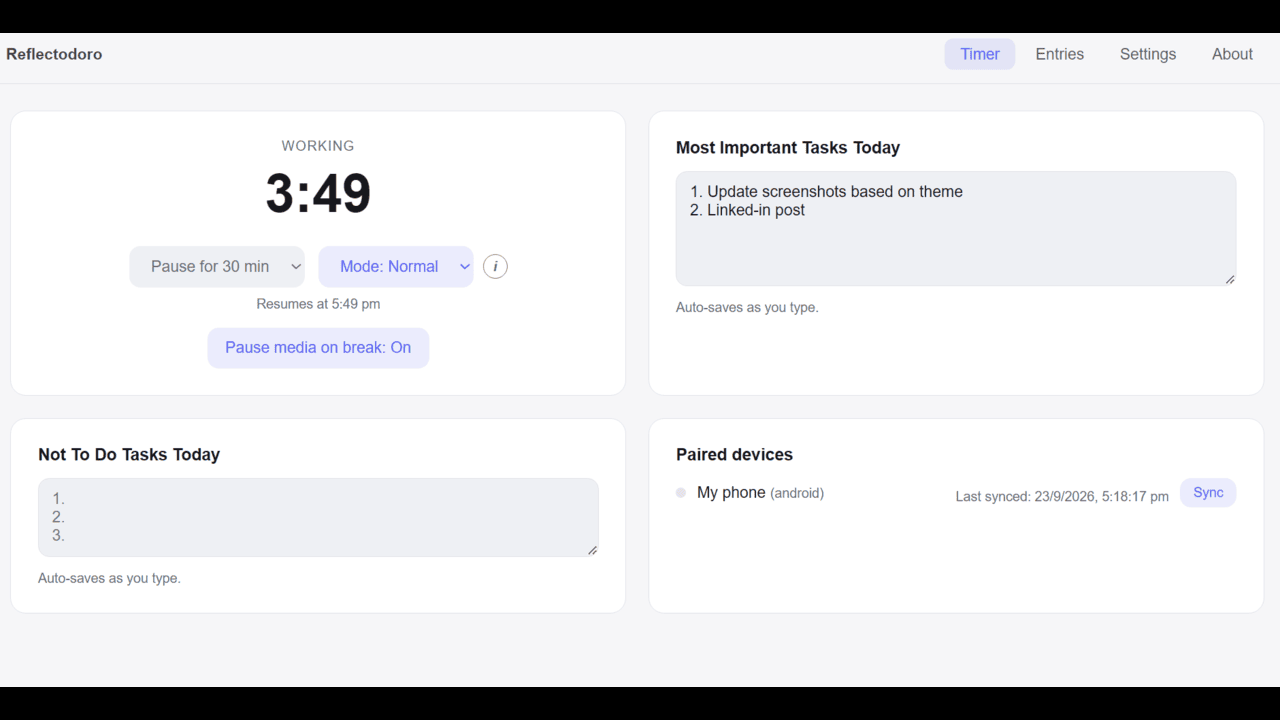
Work on the wall clock

Slots are pinned to real clock boundaries — :00–:25 work, :25–:30 break.

:00 – :25 WORK BREAK :30 – :55 WORK BREAK
2

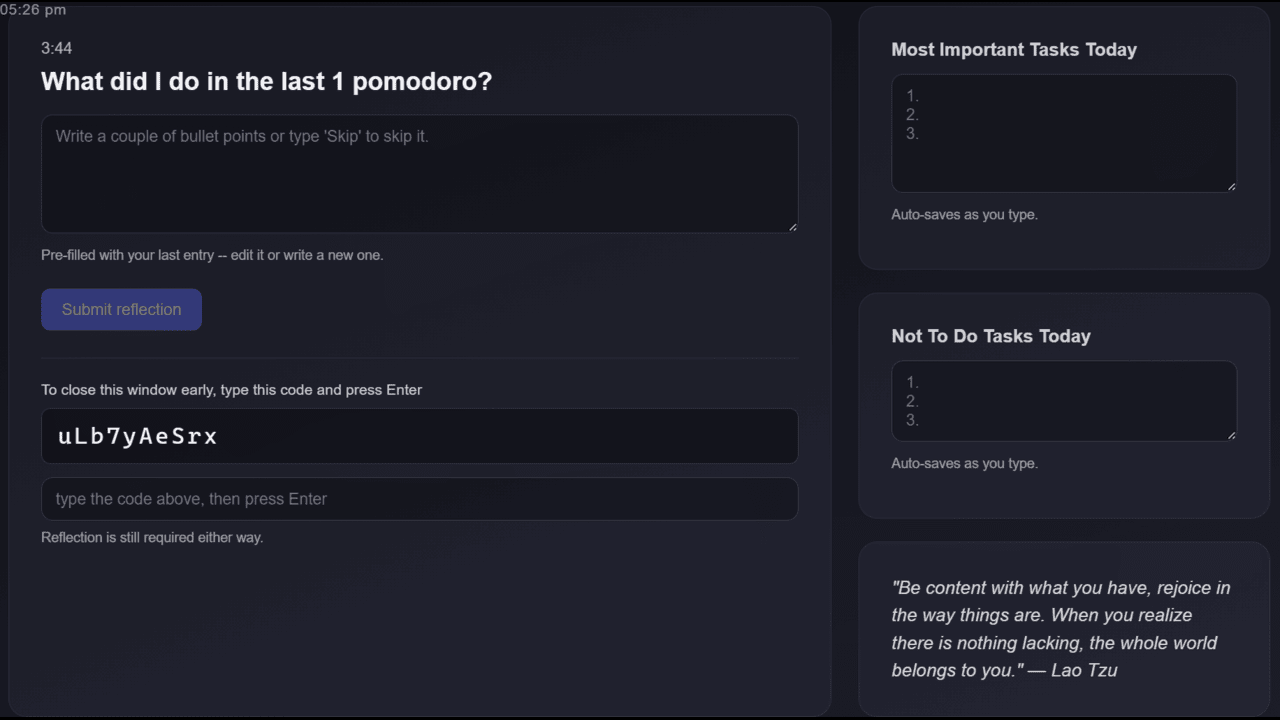
The break screen takes over

A fullscreen, always-on-top window appears. The close button is intercepted, and on Windows and Linux/X11 even Alt+Tab is suppressed while it's up.

Alt + F4 Alt + Tab Win
3

Reflect your way out

Write what you actually did. In a hurry? Type the random on-screen code to end the break early — you still have to write the reflection.

time up + reflection = unlock
4

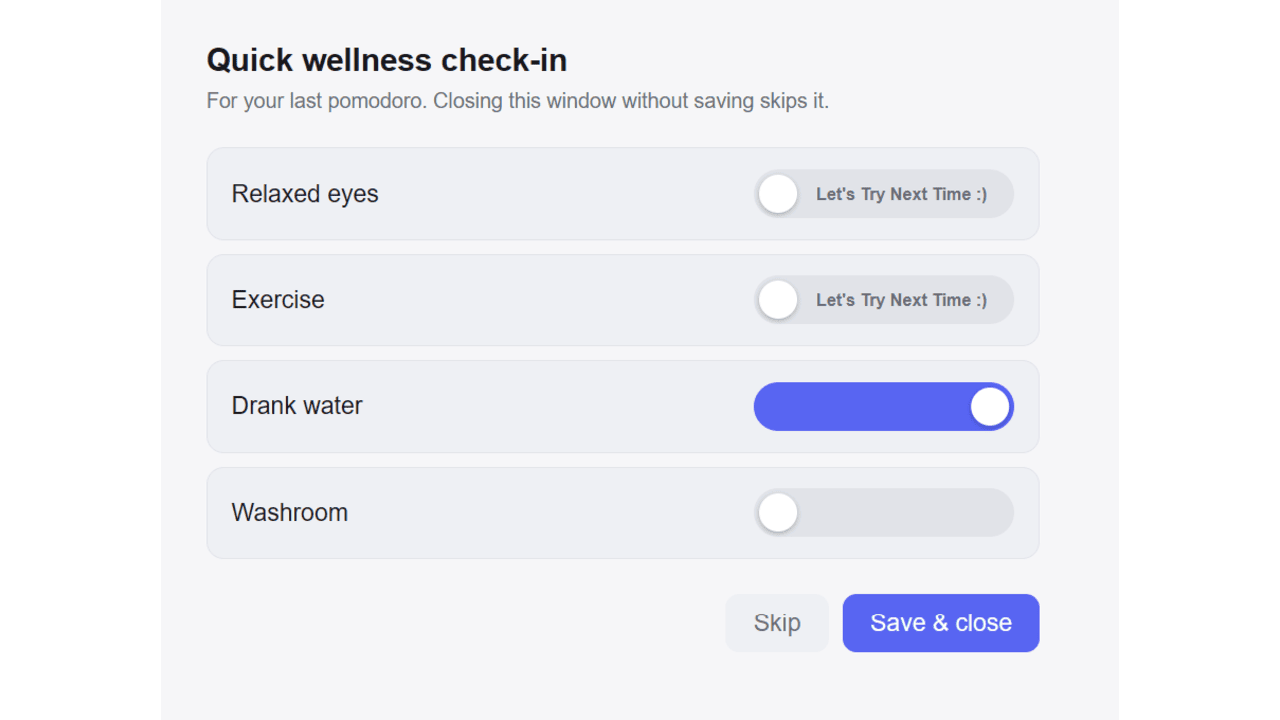
Wellness check-in

Quick toggle whether you completed intended tasks in break — Water, Exercise, Relax eyes.

Screenshots

See it in action

Features

Small app. Stubborn on purpose.

Everything below runs locally on your machine — there is no server, no account.

Wall-clock breaks

Work and break slots land on fixed clock boundaries, so your breaks are predictable and easy to plan around.

No free pass

The break screen can't be dismissed directly. You have to write what you did and wait out the break.

Emergency exit challenge

Need out early? Type a freshly generated random string shown on screen.

Wellness check

A quick end-of-break check-in for the things you skip when heads-down: eyes rested, stretched, water, washroom.

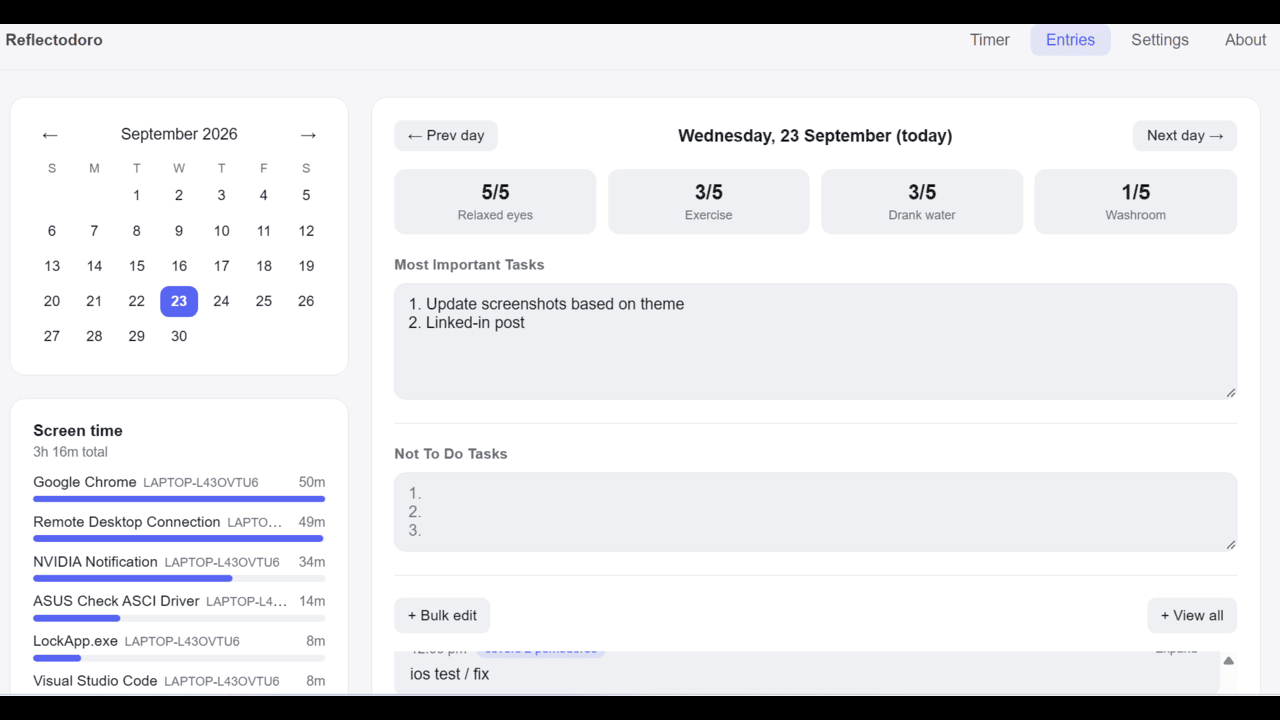
Most Important Tasks

Capture today's must-do list — plus an explicit “not to do” list — shared between the main window and the break screen.

Auto-pause your media

Music or a movie playing when the break starts? Reflectodoro pauses it, so you don't come back to spoilers.

Fully local & private

Every reflection lives in a SQLite file on your device with encryption at rest. No cloud, no account.

Cross-platform

One codebase, four signed builds — with a native break overlay and foreground scheduler on Android.

Windows Linux Android macOS iOS · planned

Custom API Support

Point the break screen's quote panel at any API to show motivational quotes, word of the day, and more.

Open source

The whole app is on GitHub and every release is built and published straight from GitHub Actions — you can read exactly what runs on your machine, or build it yourself.

Why it helps

Forced breaks aren't a gimmick.

Each card opens to the research and books the idea comes from — hover, tap or press Enter.

Platform support

What works where

Honest about the gaps: some enforcement depends on what each OS actually lets an app do.

Feature Windows Android macOS Linux
Wall-clock breaks ✓ ✓ ✓ ✓
No free pass (reflection required) ✓ ✓ ✓ ✓Only X11 based Desktops Supported
Emergency exit challenge ✓ ✓ ✓ ✓
Wellness check ✓ ✓ ✓ ✓
Fully local and private ✓ ✓ ✓ ✓
Auto-pause media on break ✓ ✓ ✓Best effort ✓
Cross-device sync (Local) ✓ ✓ ✓ ✓
Custom API Support ✓ ✓ ✓ ✓
App usage screen time ✓ ✓ ✓ ✗Planned
How we're different

Most focus apps let you shrug off the break.

Plenty of Pomodoro apps exist — a few even lock the screen. Almost none also make you say what you did before letting you back in. Here's how Reflectodoro stacks up against the well-known names in each camp: a paid enforced-break competitor, a gamified timer, a mainstream cross-platform app, and the closest open-source analog.

Feature Reflectodoro FocusMe Forest Focus To-Do pomohardo
Written reflection required to unlock the break ✓ ✗ ✗ ✓Optional, skippable ✗
Break screen resists closing (fullscreen, skip-protected) ✓ ✓ ✗Breaks are on trust ✗Break can be skipped ✓
Fixed Wall-clock slots (not a rolling timer) ✓Zero-config, Just install app and you are good to go. ✗ ✗ ✗ ✗
Desktop: Windows, macOS & Linux ✓ ✓ ✗No desktop app ✓No Linux ✓
Native Android app ✓ ✓ ✓ ✓ ✗Desktop only
Fully local — no account or cloud sync required ✓ ✗ ✗ ✗ ✓
Your entries encrypted at rest on your device ✓ ✗Only in-transit encryption documented ✗Only in-transit encryption documented ✓Profile content only, per its privacy policy ✗Probabily No
Is your data visible to the app maker? NoNo server; it never leaves your device automatically. PartlyDevice ID & synced plans; blocking stays local YesAccount & content stored on its servers, per store listing If you sign inSynced tasks are stored server-side; local mode isn't Probabily NoNo account mentioned
Analyzes your data (cloud-side)? NoNothing is sent anywhere to analyze Usage analytics“Analysing website and service use” Usage & diagnosticsCollected, per store listing Usage & crash analyticsSays task content isn't read Probabily No
Shares data with third parties? NoNothing you write leaves your device YesGoogle Analytics, Meta Pixel, Clarity (website) YesEmail shared for marketing, per store listing YesFirebase, Bugly, payment providers Probabily No
Local-only mode available? ✓Always, Local is the only mode; LAN sync is optional ✓Blocking works without an account Not documented ✓Local mode, no account; no sync ✓No account mentioned
Open source ✓ ✗ ✗ ✗ ✓

Generated based on each app's public store listings and docs as of September 2026 by AI (Information might be in-correct); features and pricing change, so check the vendor's own site before deciding. Not affiliated with or endorsed by any app listed above.

FAQ

Questions people actually ask

Especially about getting out of a break screen that won't budge.

The break screen won't close — how do I get out?

The normal way out is writing your reflection, then either waiting out the timer or typing the on-screen emergency-exit code — both still require the reflection to be submitted.

If it's genuinely stuck (a bug, not the enforcement working as intended), keep in mind the break screen is fullscreen and always-on-top — you generally can't click through to the taskbar, tray, or Task Manager to close it that way, so use one of these instead:

  • Windows / Linux — press Ctrl+Alt+Shift+F12 to instantly force-destroy the break screen. This is the reliable escape hatch on these platforms.
  • macOS — press Cmd+Option+Shift+F12.
  • Android — there's no keyboard shortcut equivalent. Go to Settings → Apps → Reflectodoro and either revoke “Display over other apps” or force-stop the app.
  • Any platform, last resort — restart your PC or phone. If the overlay stops you reaching the normal restart menu, hold the physical power button down for several seconds (on a PC, this force-shuts-it-down; press it again to power back on) to force a restart.

A dev build additionally shows a visible “Close (DEV)” button on the break screen.

Can I still answer a phone call while the break screen is up on Android?

Yes. The break screen will auto-close if there is incoming normal/VoIP call. If the call's own full-screen UI doesn't pop up automatically, pull down the notification bar from the top of the screen and answer from there — the break screen resumes once you're done.

How do I contact someone for help?

Join the Discord community — that's the fastest way to reach the developer and other users. For bugs or feature requests you can also open an issue on GitHub. Log file can be downloaded from About tab.

What happens if I don't enter a reflection before the break timer runs out?

The break screen simply stays up. Unlocking always requires a submitted reflection — the timer running out by itself never ends the break. In formula terms: (time expired AND reflection entered) OR (challenge typed AND reflection entered). So a break can run well past its nominal 5 minutes if you just don't write anything.

Does the break screen eventually auto-close on its own in that case?

Yes, as a backstop for a genuinely stuck screen — after a configurable grace period (Settings → break screen auto-close, 1–60 minutes) it force-closes itself, the same as using a kill switch: no reflection is recorded and no wellness check-in opens.

On Android, the native overlay also carries its own independent 20-minute watchdog as a second layer, in case the usual auto-close signal never reaches it.

Can I skip the reflection using the emergency-exit challenge?

No. Typing the challenge only replaces waiting out the timer — it's an early exit from the time requirement, not the reflection requirement. You still have to write and submit what you did either way.

Is my data private?

Everything is stored locally in a SQLite file on your device with encryption at rest — there's no account, no server, and nothing is uploaded on cloud.

Does Reflectodoro sync data across devices?

Cross-device data sync is on the roadmap and being built gradually, currently it supports manual sync between android/windows platform.

Can I change the work/break lengths from 25 and 5 minutes?

Not yet — they're fixed constants for now.

Why does macOS block the app with a Gatekeeper warning on first launch?

The macOS build isn't code-signed or notarized yet (no Apple Developer account). Right-click the app and choose Open, or run xattr -cr /Applications/Reflectodoro.app in Terminal to clear the quarantine flag.

Why does Android show a persistent alarm-clock icon in the status bar?

That's Android itself, not a bug: reliable break scheduling uses AlarmManager.setAlarmClock, which is the only alarm API exempt from Android's background-launch restrictions. The OS shows that icon for any app using it, for as long as Pomodoro mode is on.

What permissions does the Android app need, and why?
  • Display over other apps — draws the break screen on top of whatever you're using.
  • Notifications — shows the break notification, and a fallback if the overlay permission isn't granted.
  • Alarms & reminders — needed for exact, on-time break scheduling.

Onboarding and Settings also recommend disabling battery optimization for Reflectodoro (and enabling “auto-start” on Xiaomi/Oppo/Vivo phones) — some OEMs otherwise kill the background timer outright.

Is Reflectodoro completely free?

Reflectodoro is in early release, and every feature it has today is free as of now. Page will be updated when any feature/app is paywalled in future.

Roadmap

Coming next

In Progress

Screen Time 📱

Capture app usage screen time.

Planned

AI assistant 🤖

Help documenting tasks, tracking progress, and summarizing your reflections.

In Progress

iOS build 🍣

Add support for same app on iOS.

Development journey

Built in the open, chunk by chunk

Last 7 days

Tuesday, Oct 6, 2026

  • Added an Upcoming events card to the home screen: pick a country in Settings for its public holidays, and/or paste your Google Calendar’s secret iCal address to see your own events too, with recurring events, time zones and all-day events handled. It needs no Google sign-in, the address is stored encrypted on your device only (never exported or synced), and events are kept in memory rather than saved to disk
  • Habits that are due today now get a “Due” badge on the Habits tab, which turns into “Overdue” once you are past your every-N-days target. Due and overdue habits are also listed on the main Timer screen, right after Upcoming events, with a one-tap “Done” button to log them
  • Fixed the break screen staying open after its time was up, even with your reflection entered, when auto-pause on wake had paused Pomodoro mode during that break

Monday, Oct 5, 2026

  • App lock now comes with a recovery code: when you set a PIN, Reflectodoro shows a one-time code to save. If you forget the PIN, entering that code lets you choose a new one without erasing anything. Existing PINs can generate a code from Settings
  • The break screen now lists habits that have reached their "every N days" target, under the reflection box, with a one-tap button to log each one. It can be switched off in Settings if others can see your screen
  • Settings has a navigation panel on the left that highlights the section you're reading and jumps to any other in one click. On phones it becomes a swipeable row of links across the top

Sunday, Oct 4, 2026

  • Added a Habits tab for recurring personal events that aren't Pomodoro work, like periods, hair wash or medication: log each time one happens (with an optional time and note, and backdating), see days since last done, average gap and an overdue badge, and browse a colour-coded calendar and timeline. Everything is encrypted on disk and syncs between your paired devices, including deletes
  • On Windows, time with your screen locked or turned off is no longer counted in screen time, and auto-pause on wake now also kicks in when you come back to a locked or dark screen, not just after sleep. Both can be adjusted in Settings
  • New optional app lock on every platform: set a 4–12 digit PIN in Settings and Reflectodoro asks for it whenever you come back to it from another app, so nobody else can read your entries. Five wrong tries within 15 minutes pauses PIN entry until the 15 minutes are up

Friday, Oct 2, 2026

  • Android now shows only the native break screen when “Display over other apps” is granted, instead of stacking a second, redundant break screen underneath it, and the break notification becomes an ordinary dismissible one rather than a sticky one
  • Fixed the wellness check-in sometimes not appearing on Android after you submitted your reflection from the break screen over another app — it now shows up the next time you open the app even if the signal was missed

Wednesday, Sep 30, 2026

  • Added an optional daily summary: point Settings at an AI running on your own machine (Ollama, LM Studio, or any OpenAI-compatible server) and a Summarize button on the Entries tab turns the selected day's reflections into a short recap. It's off by default, sends nothing until you click, never saves the summary anywhere, and the instructions sent to the model are editable in Advanced settings

Previous 3 weeks

Week of Sep 28 – Oct 4, 2026

  • Added auto-pause on wake for desktop: if your computer wakes after being off for a while and a session is about to end, Pomodoro mode pauses itself for a set time, so reopening your laptop moments before a boundary doesn't drop you straight into a break you never chose. On by default, with all three thresholds adjustable in Settings
  • Reworked how Android checks the app is still running at a break boundary, so a healthy app is no longer relaunched over whatever you were doing after the screen had been off for a while, and the break screen appears promptly

Week of Sep 21 – 27, 2026

  • Brought Reflectodoro to iPhone and iPad: wall-clock break scheduling, break notifications, a Live Activity countdown on the Lock Screen, the full break screen with the emergency-exit challenge, Keychain-backed encryption, media pause-on-break, and new app icons. iPhone can also sync directly with your other devices over wifi, with no account or cloud involved. Not yet distributed through the App Store; for now it's installed from Xcode, and syncing is manual and works while the app is open
  • Added a Concentration schedule alongside the normal one — a 1-minute break at :25 and a longer 10-minute break at :50 — picked from a new dropdown on the Timer tab, with your reflection still required after both. That short break skips the quote panel, since it's too brief to read one, and iOS break notifications follow the schedule you pick
  • You can now protect your encryption key with a password instead of the system password vault, switch between the two from a new Advanced settings section, and show, copy and restore it for safekeeping. The app no longer quietly creates a brand-new key when it can't reach the one your entries were saved with, and if a break arrives before you've unlocked, you can skip it from the password prompt
  • Android break screen improvements: the end-of-break quote panel now works there too, the break screen steps aside while a phone or VoIP call rings or is active, and Pomodoro mode can pause itself overnight (10pm to 8am by default, adjustable or switchable off in Settings)
  • Added a Theme setting (Auto/Light/Dark) applied instantly across every window, a redesigned hourglass app icon on every platform, and wider pages with text scaled up to match on large windows
  • Added a configurable credit line under the break screen's quote, so whichever quote service you point it at can be attributed properly
  • Added a “Delete data” card to Settings → Advanced settings (delete entries older than a number of days you choose, or wipe everything, with confirmation and without touching your settings, paired devices or encryption key), and fixed the snooze dropdown quietly shortening a 6 or 12 hour pause to 2 hours
  • Fixed Most Important Tasks and the Not To Do list going missing on the break screen, a failed save that could vanish silently, Android playing two notification sounds for a single break, the Timer page overflowing on some iPhones, and Entries days that can't be read now showing an error with a Retry button and a way to delete just that day's data

Week of Sep 14 – 20, 2026

  • Added a daily cap on emergency-exit (breakit) code uses, a “Coming next” preview, bulk-edit and full-day views for reflections with saveable Prefill presets for recurring routines (sleep, lunch, ...), an auto-scrolling reflection list now ordered oldest-first to match “View all”, and a configurable quote panel pulling short text from a user-set API for the end of a break
  • Added encryption at rest for reflections, task lists and your screen time history — the names of the apps you use are encrypted on disk too — with the key held in your operating system's own secure storage (Windows Credential Manager, macOS Keychain, Linux Secret Service, Android Keystore), and added a privacy policy page. Encryption now covers when each reflection was written and last edited too, since those timestamps alone could reveal your sleep and working patterns
  • Rebuilt how device sync works out what changed, fixing three ways entries could silently never reach a paired device: after a system clock change, when passing between three or more paired devices, and when restoring an older backup onto an already-paired device
  • Added an “Export system info” button to the About page so a bug report can include your OS, display and device details, and simplified how the app sets up its local database on first launch (existing reflections, settings and pairings are untouched)
  • Added per-device auto-sync for paired devices, plus a home-screen widget to sync and manage pairings without opening Settings
  • macOS now pauses your media during a break without asking for any permission — it pauses rather than toggles, so it can't un-pause something you'd paused yourself — with Pause and Resume buttons on the break screen, and screen time now tracks which app you're using on a Mac too, with friendly app names and no permission prompt
  • Fixed the macOS break screen failing to appear over full-screen apps or covering only the top of the display, the main window and overlay clocks freezing or showing stale time, and the reflection field pre-filling from the wrong slot instead of your last entry
  • Added the Google Play Store listing identifier, kept Android debug symbols for crash reports, improved macOS startup diagnostics, refreshed the snooze duration options, stopped writing the emergency-exit challenge value to the log file, and made the Entries page show an error with a Retry button instead of spinning forever when a day can't be loaded

Earlier

September 2026

  • Added P2P LAN device pairing and manual sync between two devices on the same wifi, with no server or cloud involved
  • Added screen time tracking on Windows and Android, showing which apps you spent your day in with friendly app names
  • Added full macOS break-screen enforcement (Cmd+Tab blocking, following you across every Space, opt-in menu bar/Dock hiding), and fixed a macOS crash loop and a break screen that sometimes didn't appear at all
  • Added a snooze option to the Pomodoro dropdown, a “Not to do” list alongside Most Important Tasks, editable tasks and past reflections, bulk-edit for reflections across a time range, and a reflection field pre-filled with your last entry
  • Signed Android release builds, and made data import transactional and merge-aware so a failed import can no longer leave the database partially written
  • Fixed reflections being filed under the wrong slot or day, emergency-exit challenge bugs, Linux packaging issues, a white-screen overlay after Windows monitor sleep, a frozen timer after breaks, and log files being deleted instead of archived (logs can now be exported from the About page)
  • Completed a full-codebase audit, fixing a DST crash, a data-import bug that could wipe history, and ways the break screen could strand users, and hardened Android and the release pipeline
  • Redesigned the landing page with a new theme, an FAQ, a benefits section, OS-aware downloads, and a Discord community link

August 2026

  • First release: the Windows app, with the auto-updater, a GitHub Actions release pipeline, and the first landing page
  • Shipped the full Android release — a native break screen over other apps that survives the app being closed, permissions onboarding, media pause, and the Most Important Tasks list — with a downloadable APK
  • Added macOS (Apple Silicon and Intel) and Linux (including ARM) builds
  • Added the wellness check-in after breaks, pausing media when a break starts, and an About page with a check-for-updates button
  • Fixed the app not coming back to the foreground after the Android break screen closed, a hibernation edge case, and the on-screen keyboard covering the task list on Android
  • Housekeeping: a Noncommercial license and Contributor License Agreement, structured logging, optional settings in data export/import, a Windows installer-only bundle, and a smaller Android release binary